 grove
grove
Grove
Grove is a local-first, terminal-based toolkit for AI-assisted software development. It aims to make coding with AI feel more deliberate, controlled, and organized. It primarily serves as an orchestration layer for agents like Claude Code and API calls. Grove also has tools and approaches to context engineering, information management, workspace discovery, project navigation, and scenario-based testing. It integrates with tmux and Neovim.
I am Matthew Solomonson and this is a personal project. At my day job, I’m a developer at the Broad Institute of MIT and Harvard where I create web applications for exploring large genomic datasets (e.g. The gnomAD browser, Genebass). A note of caution: Every line of code was written by AI agents orchestrated through Grove, and not every line was carefully reviewed. This is an ongoing experiment — use at your own risk, though I try to be extremely careful about context my agents access. Currently, I will not accept pull requests from people I don’t know and trust.
Much of the documentation on this website was generated by LLMs (using the docgen tool) with the exception of this introductory page which was human-written, save for minor LLM proofreading and the mermaid diagrams.
Tools
Grove is a composable suite of independent CLI tools that tackle different aspects of AI-assisted coding.
{
  "tools": [
    {
      "name": "cx",
      "title": "cx",
      "description": "Generates context bundles based on glob rules for large codebases and cross-repository referencing with token analysis capabilities.",
      "github": "https://github.com/grovetools/cx",
      "docs": "/docs/cx/01-overview/",
      "section": "#1-context-engineering",
      "badges": [
        { "img": "https://img.shields.io/github/v/release/grovetools/cx?color=blueviolet", "url": "https://github.com/grovetools/cx/releases", "alt": "Release" },
        { "img": "https://img.shields.io/github/license/grovetools/cx", "alt": "License" },
        { "img": "https://img.shields.io/github/go-mod/go-version/grovetools/cx", "alt": "Go Version" }
      ],
      "asciinema": {
        "src": "/docs/overview/asciicasts/cx-rules-file.cast",
        "poster": "npt:10",
        "viewbox": { "zoom": 2.5, "x": 0, "y": 20 },
        "desktop": { "viewbox": { "zoom": 1 } }
      }
},
{
      "name": "flow",
      "title": "flow",
      "description": "Markdown-based orchestration tool for managing plans, agent lifecycles, and Git worktree isolation.",
      "github": "https://github.com/grovetools/flow",
      "docs": "/docs/flow/01-overview/",
      "section": "#2-plain-text-markdown-based-orchestration-and-artifacts",
      "badges": [
        { "img": "https://img.shields.io/github/v/release/grovetools/flow?color=blueviolet", "url": "https://github.com/grovetools/flow/releases", "alt": "Release" },
        { "img": "https://img.shields.io/github/license/grovetools/flow", "alt": "License" },
        { "img": "https://img.shields.io/github/go-mod/go-version/grovetools/flow", "alt": "Go Version" }
      ],
      "asciinema": {
        "src": "/docs/overview/asciicasts/flow-groved-demo.cast",
        "poster": "npt:10",
        "viewbox": { "zoom": 1.8, "x": 1, "y": 15 },
        "desktop": { "viewbox": { "zoom": 1 } }
      }
    },
    {
      "name": "nav",
      "title": "nav",
      "description": "Keyboard-focused session manager for tmux. Provides 'Harpoon'-style rapid navigation across projects and visualizes Git status.",
      "screenshot": "/docs/overview/images/nav-overview-light.png",
      "screenshotDark": "/docs/overview/images/nav-overview-dark.png",
      "github": "https://github.com/grovetools/nav",
      "docs": "/docs/nav/01-overview/",
      "section": "#keyboard-based-navigation",
      "screenshotCrop": { "zoom": 1.5, "x": 50, "y": 20 },
      "asciinema": {
        "src": "/docs/overview/asciicasts/nav-demo.cast",
        "poster": "npt:10",
        "viewbox": { "zoom": 1.8, "x": 1, "y": 15 },
        "desktop": { "viewbox": { "zoom": 1 } }
      },
      "badges": [
        { "img": "https://img.shields.io/github/v/release/grovetools/nav?color=blueviolet", "url": "https://github.com/grovetools/nav/releases", "alt": "Release" },
        { "img": "https://img.shields.io/github/license/grovetools/nav", "alt": "License" },
        { "img": "https://img.shields.io/github/go-mod/go-version/grovetools/nav", "alt": "Go Version" }
      ]
    },
    {
      "name": "nb",
      "title": "nb",
      "description": "Workspace-aware notebook manager. Organizes notes, plans, and other artifacts relative to specific repositories and branches.",
      "github": "https://github.com/grovetools/nb",
      "docs": "/docs/nb/01-overview/",
      "section": "#4-repo-paired-notebooks",
      "badges": [
        { "img": "https://img.shields.io/github/v/release/grovetools/nb?color=blueviolet", "url": "https://github.com/grovetools/nb/releases", "alt": "Release" },
        { "img": "https://img.shields.io/github/license/grovetools/nb", "alt": "License" },
        { "img": "https://img.shields.io/github/go-mod/go-version/grovetools/nb", "alt": "Go Version" }
      ],
      "asciinema": {
        "src": "/docs/overview/asciicasts/nb-demo.cast",
        "poster": "npt:50",
        "viewbox": { "zoom": 2.3, "x": 0, "y": 35 },
        "desktop": { "viewbox": { "zoom": 1 } }
      }
    },
    {
      "name": "hooks",
      "title": "hooks",
      "description": "Local observability for agent sessions. Tracks agent state (idle/running), sends notifications, and logs activity.",
      "github": "https://github.com/grovetools/hooks",
      "docs": "/docs/hooks/01-overview/",
      "section": "#observability",
      "badges": [
        { "img": "https://img.shields.io/github/v/release/grovetools/hooks?color=blueviolet", "url": "https://github.com/grovetools/hooks/releases", "alt": "Release" },
        { "img": "https://img.shields.io/github/license/grovetools/hooks", "alt": "License" },
        { "img": "https://img.shields.io/github/go-mod/go-version/grovetools/hooks", "alt": "Go Version" }
      ],
      "asciinema": {
        "src": "/docs/overview/asciicasts/hooks-demo.cast",
        "poster": "npt:10",
        "viewbox": { "zoom": 1.7, "x": 1, "y": 10 },
        "desktop": { "viewbox": { "zoom": 1 } }
      }
    },
    {
      "name": "grove.nvim",
      "title": "grove.nvim",
      "description": "Neovim plugin for managing context rules, running chats, and inspecting plans directly from the editor.",
      "github": "https://github.com/grovetools/grove.nvim",
      "docs": "/docs/grove.nvim/01-overview/",
      "section": "#glob-based-rules",
      "badges": [
        { "img": "https://img.shields.io/github/v/release/grovetools/grove.nvim?color=blueviolet", "url": "https://github.com/grovetools/grove.nvim/releases", "alt": "Release" },
        { "img": "https://img.shields.io/github/license/grovetools/grove.nvim", "alt": "License" }
      ],
      "asciinema": {
        "src": "/docs/overview/asciicasts/nvim-demo.cast",
        "poster": "npt:10",
        "viewbox": { "zoom": 1.0, "x": 1, "y": 0 },
        "desktop": { "viewbox": { "zoom": 1 } }
      }
    },
    {
      "name": "grove",
      "title": "grove",
      "description": "The meta-CLI and package manager. Manages tool installation, updates, and binary resolution for local development.",
      "github": "https://github.com/grovetools/grove",
      "docs": "/docs/grove/01-overview/",
      "section": "#getting-started",
      "badges": [
        { "img": "https://img.shields.io/github/v/release/grovetools/grove?color=blueviolet", "url": "https://github.com/grovetools/grove/releases", "alt": "Release" },
        { "img": "https://img.shields.io/github/license/grovetools/grove", "alt": "License" },
        { "img": "https://img.shields.io/github/go-mod/go-version/grovetools/grove", "alt": "Go Version" }
      ],
      "asciinema": {
        "src": "/docs/overview/asciicasts/grove-cli-demo.cast",
        "poster": "npt:10",
        "viewbox": { "zoom": 1.7, "x": 1, "y": 0 },
        "desktop": { "viewbox": { "zoom": 1 } }
      }
    },
    {
      "name": "tend",
      "title": "tend",
      "description": "Scenario-based E2E testing library. Used to validate CLI tools and TUI applications within the ecosystem.",
      "github": "https://github.com/grovetools/tend",
      "docs": "/docs/tend/01-overview/",
      "badges": [
        { "img": "https://img.shields.io/github/v/release/grovetools/tend?color=blueviolet", "url": "https://github.com/grovetools/tend/releases", "alt": "Release" },
        { "img": "https://img.shields.io/github/license/grovetools/tend", "alt": "License" },
        { "img": "https://img.shields.io/github/go-mod/go-version/grovetools/tend", "alt": "Go Version" }
      ],
      "asciinema": {
        "src": "/docs/overview/asciicasts/tend-demo.cast",
        "poster": "npt:10",
        "viewbox": { "zoom": 1.7, "x": 1, "y": 10 },
        "desktop": { "viewbox": { "zoom": 1 } }
      }
    },
    {
      "name": "docgen",
      "title": "docgen",
      "description": "LLM-powered documentation generator that analyzes source code to create and maintain documentation.",
      "github": "https://github.com/grovetools/docgen",
      "docs": "/docs/docgen/01-overview/",
      "badges": [
        { "img": "https://img.shields.io/github/v/release/grovetools/docgen?color=blueviolet", "url": "https://github.com/grovetools/docgen/releases", "alt": "Release" },
        { "img": "https://img.shields.io/github/license/grovetools/docgen", "alt": "License" },
        { "img": "https://img.shields.io/github/go-mod/go-version/grovetools/docgen", "alt": "Go Version" }
      ],
      "asciinema": {
        "src": "/docs/overview/asciicasts/docgen-demo.cast",
        "poster": "npt:10",
        "viewbox": { "zoom": 1.5, "x": 1, "y": 0 },
        "desktop": { "viewbox": { "zoom": 1 } }
      }
    },
    {
      "name": "skills",
      "title": "skills",
      "description": "CLI tool for managing agent skills either system-wide or scoped to individual projects.",
      "github": "https://github.com/grovetools/skills",
      "docs": "/docs/skills/01-overview/",
      "section": "#skills--concepts",
      "badges": [
        { "img": "https://img.shields.io/github/v/release/grovetools/skills?color=blueviolet", "url": "https://github.com/grovetools/skills/releases", "alt": "Release" },
        { "img": "https://img.shields.io/github/license/grovetools/skills", "alt": "License" },
        { "img": "https://img.shields.io/github/go-mod/go-version/grovetools/skills", "alt": "Go Version" }
      ],
      "asciinema": {
        "src": "/docs/overview/asciicasts/skills-demo.cast",
        "poster": "npt:10",
        "viewbox": { "zoom": 1.7, "x": 1, "y": 10 },
        "desktop": { "viewbox": { "zoom": 1 } }
      }
    }
  ]
}
Guiding Design Principles
1. Context Engineering
Context engineering is part of what makes AI-assisted coding feel controlled rather than chaotic. Curating context carefully forces you to clarify the scope of a task, for yourself and the LLM.
Glob-Based Rules
When developing with agents like Claude Code, one often relies on the agent to search a codebase to identify files relevant to a request. While many tools allow pointing agents to files using an @ symbol, Grove uses cx rules files to define context using .gitignore-style patterns. These files use directives that enable the user to quickly pull in repositories from the local file system or from GitHub by commit, ref, or tag.
{
  "src": "/docs/overview/asciicasts/cx-rules-file.cast",
  "autoPlay": true,
  "loop": true
}cx rules file in Neovim. The grove.nvim plugin supports autocomplete and token analysis on a per-line basis. Grove’s Workspace Model ensures only code from allowed paths can be referenced.Rules files can be saved, pinned to jobs/chats, and imported by other repositories. In this way, you can create pre-defined slices of codebases across the filesystem to reduce time waiting for agents to grep for context repeatedly.
Context Generation
Once a rules file is defined, the cx tool resolves these patterns to a list of files for token analysis and file concatenation. cx respects .gitignore and excludes large binary files by default. The cx view TUI provides analysis tools for identifying unwanted files and file types that are occupying context so they can be excluded (e.g., !*.json). Once a file list is finalized, agents can be instructed to call cx list directly to see which files to consider. Running cx generate produces a concatenated XML file that can be uploaded to LLMs like the Gemini API along with user prompts.
{
  "src": "/docs/overview/asciicasts/cx-generate.cast",
  "autoPlay": true,
  "loop": true
}cx view TUI and generating curated codebase context bundles with cx generate.Plan vs. Execute
Why go to this level of effort for context curation?
Many agents, such as Claude Code, feature a “Plan Mode” for designing complicated changes up front. However, it takes time for the agent to spawn “sub-agents” to search for files, understand the codebase, assemble its own context, and finally think about the work at hand. The agent may not find everything and often needs to be spoon-fed prompts (e.g., “you forgot about this shared utility function over there”). You may decide to switch to other projects or worktrees while you wait. These factors play a significant role in why many developers dislike the agent-based coding experience.
With the cx tool, it becomes routine to upload large chunks of a codebase to LLM APIs (like Gemini 3 Pro) along with a user prompt. In my experience, this produces significantly better plans in a fraction of the time compared to an agent’s “Plan Mode”. The developer can have a speedy back-and-forth chat with the LLM API that contains precisely the required context at every turn.
flowchart TD
    %% Context Phase
    subgraph Prep ["Context Engineering"]
        direction TB
        Rules["cx rules"]:::cyanNode
        Gen["cx generate"]:::cyanNode
        XML[("Context XML")]:::magentaNode

        Rules --> Gen --> XML
    end

    %% Planning Phase
    subgraph Plan ["Planning (LLM API)"]
        direction TB
        Prompt["User Prompt"]:::cyanNode
        API{{"LLM API"}}:::blueNode
        Artifact["Detailed Plan"]:::magentaNode

        XML --> API
        Prompt --> API
        API --> Artifact
        Artifact -.->|"Iterate"| API
    end

    %% Execution Phase
    subgraph Exec ["Execution (Agent)"]
        direction TB
        Agent["Coding Agent"]:::greenNode
        Code["Codebase"]:::successNode

        Agent -->|"Implement"| Code
    end

    %% Connections
    Artifact -->|"Feed Plan"| Exec
Requests of this nature typically take 30 seconds to 1 minute. After a high-level plan is finalized, I like to finalize the chat by producing large chunks of the detailed code changes at the end of a plan file, especially if the changes are complicated or delicate. I then feed the final plan file to coding agents for implementation almost exactly as written. Alternatively, I might ask the agent to review the plan a second time to look for gaps—now I have two frontier models considering the problem using different approaches (one-shot vs. tool-based). Agents spend much less time grepping, churning, thinking, and hallucinating file paths. Agents become the execution engine of a pre-formed, high-quality, detailed plan.
One very important caveat: using LLM APIs to plan in this way is significantly more expensive compared to using Plan Mode as part of a fixed monthly subscription. However, the time saved, the ability to stay in flow, and the high quality of the detailed plans have made it worth it to me. When I revert to using an agent’s Plan Mode and its own discovery mechanisms, I often find myself frustrated by the inefficiency.
2. Orchestration in Markdown
When coding with AI, I need to be able to copy and paste file paths everywhere: add them to context, have agents read them, reference them in a plan, and save them for later. File paths represent knowledge. My most used Neovim key binding in the AI coding era is <leader>cp, which yanks the absolute file path of the current buffer. All of Grove’s TUIs have file path yank commands. I want my AI coding experience to be compatible with Markdown-oriented tools like nvALT and Obsidian.
This is why Grove’s approach to orchestration is Markdown-based. Workflows are defined as Plans—directories of Markdown files where each file represents a Job. Grove aims to keep everything as plain text so that it remains accessible to both agents and the cx tool.
Job Execution
Jobs define dependencies (depends_on), creating a Directed Acyclic Graph (DAG) of tasks. Jobs can contain rough ideas, bug reports, or complete specifications. They can be submitted to LLM APIs, along with portions of the codebase, to create one-shot plans, or they can serve as a back-and-forth session (with the codebase in context). They are used in “briefings” to explain tasks to agents, which then append their logs to the same Markdown file.
Structured Briefings
Every job has an associated “briefing file” that instructs the LLMs on which files to pay attention to alongside the user instructions. Context can be selectively prepended to the briefing file if specific files need extra attention.
3. Workspaces
AI-assisted coding enables us to explore many ideas expressed as new projects or features. Grove’s Workspace Model came from my desire to manage the complexity that comes with trying more things. I wanted to create new repositories or worktrees instantly, then clean them up when done. I wanted to jump to any project or worktree with a few keystrokes. I wanted to know where agents are running or idle, and hop between them.
Grove Workspace Model
Grove’s tools use the workspace model for different things, for example:
- Cross-repo context sharing (
cx) - Notebooks (
nb) - Project Navigation (
nav) - Managing repository worktrees (
flow) - Managing a group of related worktrees (
flow) - Multi-repository documentation websites like this one (
docgen) - Agent observability (
hooks) - Scoped agent skill installation and sync (
skills) - Setting a worktree’s binary globally active (
grove)
Grove also has the concept of an “Ecosystem” that I have found useful — this is often a group of related repositories that are expected to evolve together, or perhaps you just want to access them in one place. Using Ecosystems, Grove can instantiate synchronized worktrees across multiple repositories, allowing agents to make concerted changes across microservices or libraries in a single, isolated directory.
flowchart TD
    %% Ecosystem
    subgraph Eco ["Ecosystem"]
        direction TB
        ER["my-ecosystem<br/><small>group of related repositories</small>"]:::magentaNode
        SUB_PA[("project-a<br/><small>nested git repository</small>")]:::blueNode
        SUB_PB[("project-b<br/><small>nested git repository</small>")]:::blueNode
        ER -->|"contains"| SUB_PA
        ER -->|"contains"| SUB_PB

        SUB_P_WT["project-a-feature-x<br/><small>isolated branch</small>"]:::greenNode
        SUB_PA -.->|"git worktree"| SUB_P_WT

        EW["eco-feature<br/><small>ecosystem-wide branch</small>"]:::greenNode
        ER -.->|"git worktree"| EW

        EW_SUB_A["project-a<br/><small>linked worktree</small>"]:::cyanNode
        EW_SUB_B["project-b<br/><small>linked worktree</small>"]:::cyanNode
        EW -->|"contains"| EW_SUB_A
        EW -->|"contains"| EW_SUB_B
endFor a project to be discovered as a workspace, the user must define a search path as shown below. Any directory with a .git repository will be discovered—those with a grove.toml are classified as Grove Projects, while those without are discovered as Non-Grove Repos (still usable, but without Grove-specific features).
[groves.projects]
path = "~/code/projects"grove.toml for workspace discovery.We can use the grove CLI and flow to create the following ecosystem and assortment of worktrees:
#!/bin/bash

grove ecosystem init my-ecosystem
cd my-ecosystem

grove repo add project-a
grove repo add project-b

cd project-a

# new single worktree for project-a
flow plan init feature-x --worktree

# back to ecosystem root
cd ..

# create sister worktrees for project-a and -b
flow plan init eco-feature --worktreeThis creates the project structure:
~/code/projects/
└── my-ecosystem/
    ├── project-a/
    │   └── .grove-worktrees/
    │       └── feature-x/
    ├── project-b/
    └── .grove-worktrees/
        └── eco-feature/
            ├── project-a/
└── project-b/Worktrees can be rebased & cleaned up with flow plan finish. This includes checks for dirty/unmerged work.
Keyboard Navigation
Workspaces make it possible to jump to any discovered project in a few keystrokes using the nav tool and tmux. The desire to navigate this way may have come from years spent RTS gaming (AOE2, WC3, SC), where using control groups and hotkeys is required to be competitive. In Grove, I built my dream hotkey-to-project navigation system in the nav tool! I can’t live without it now. It is directly inspired by The Primeagen’s harpoon and tmux-sessionizer which are Neovim and tmux tools, respectively for jumping between files and projects with ad-hoc key bindings for what you’re working on right now. I use Control-F to trigger a tmux popup containing nav sessionize:
In nav sz, you can see git changes across projects/worktrees, associated flow plans, nb notes for that repository, view binary release versions, jump to repositories grouped by Ecosystem, and filter the list by pressing /.
The nav keymap TUI is a bit like a favorites menu. Each workspace gets a key such that leader-{w,e,r,t,y...} jumps to that workspace’s directory via a new or existing tmux session.
nav keymap by pressing M and arrow keys.nav history keeps track of most recent sessions, and nav windows can be used to move or close windows within a session. tmux shines in the LLM-coding era, where I find myself creating many windows for agents, notes, contexts, plans, terminals, and editors.
Workspaces in action
As a concrete example…
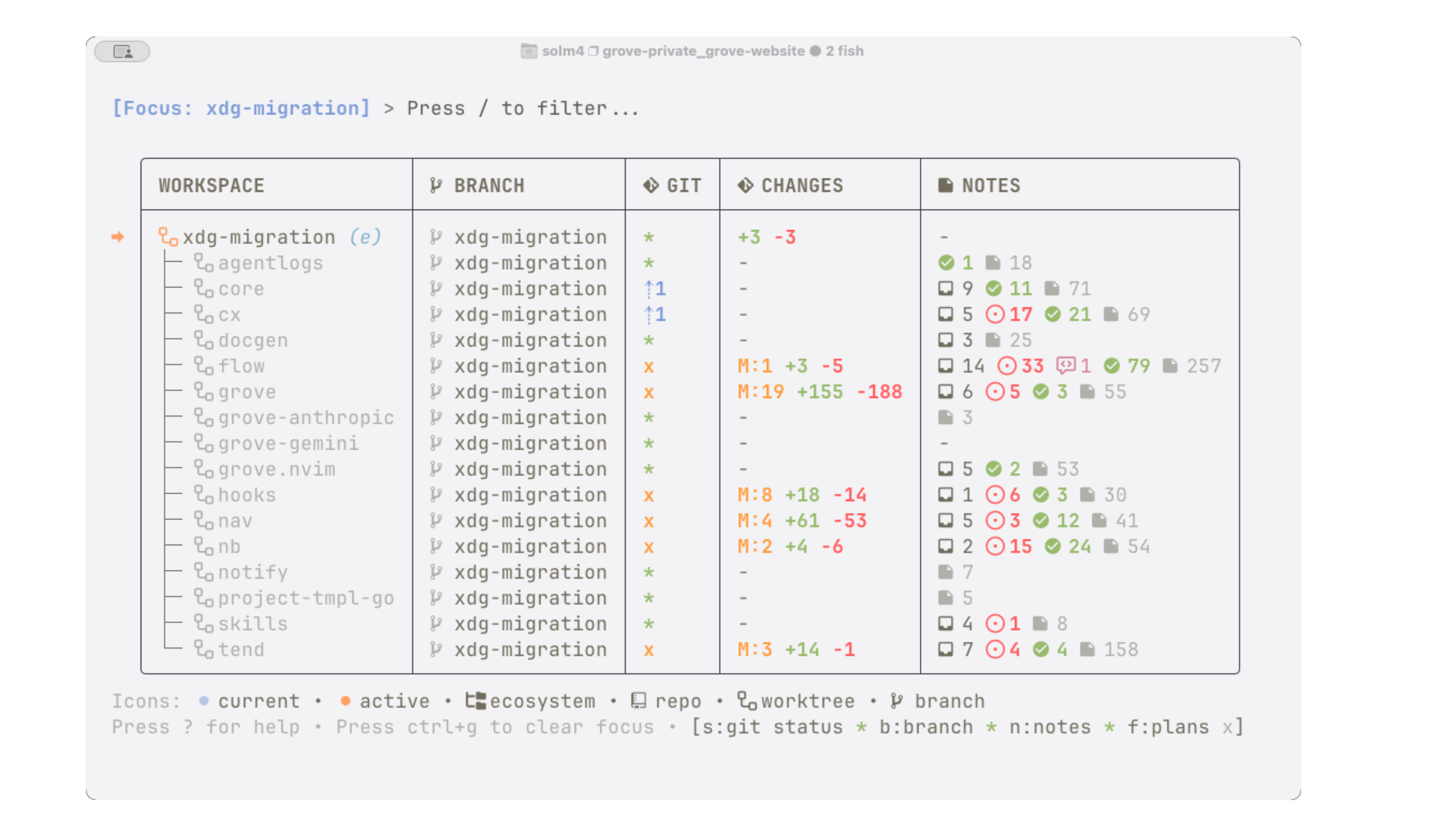
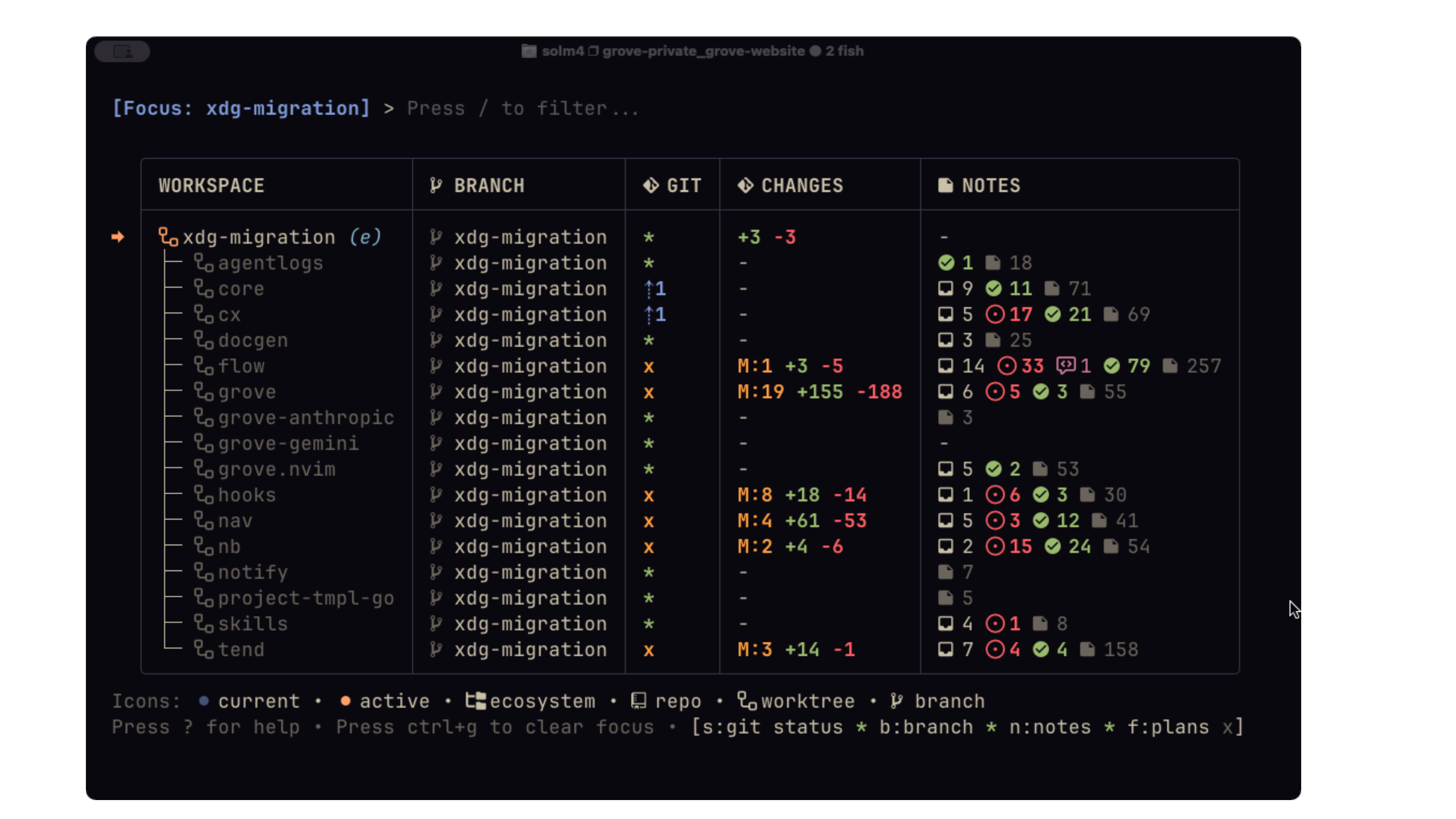
EcosystemWorktree so that every package used the core library to unify how they handle XDG_ paths. Every git repository gets its own managed worktree & branch for the migration.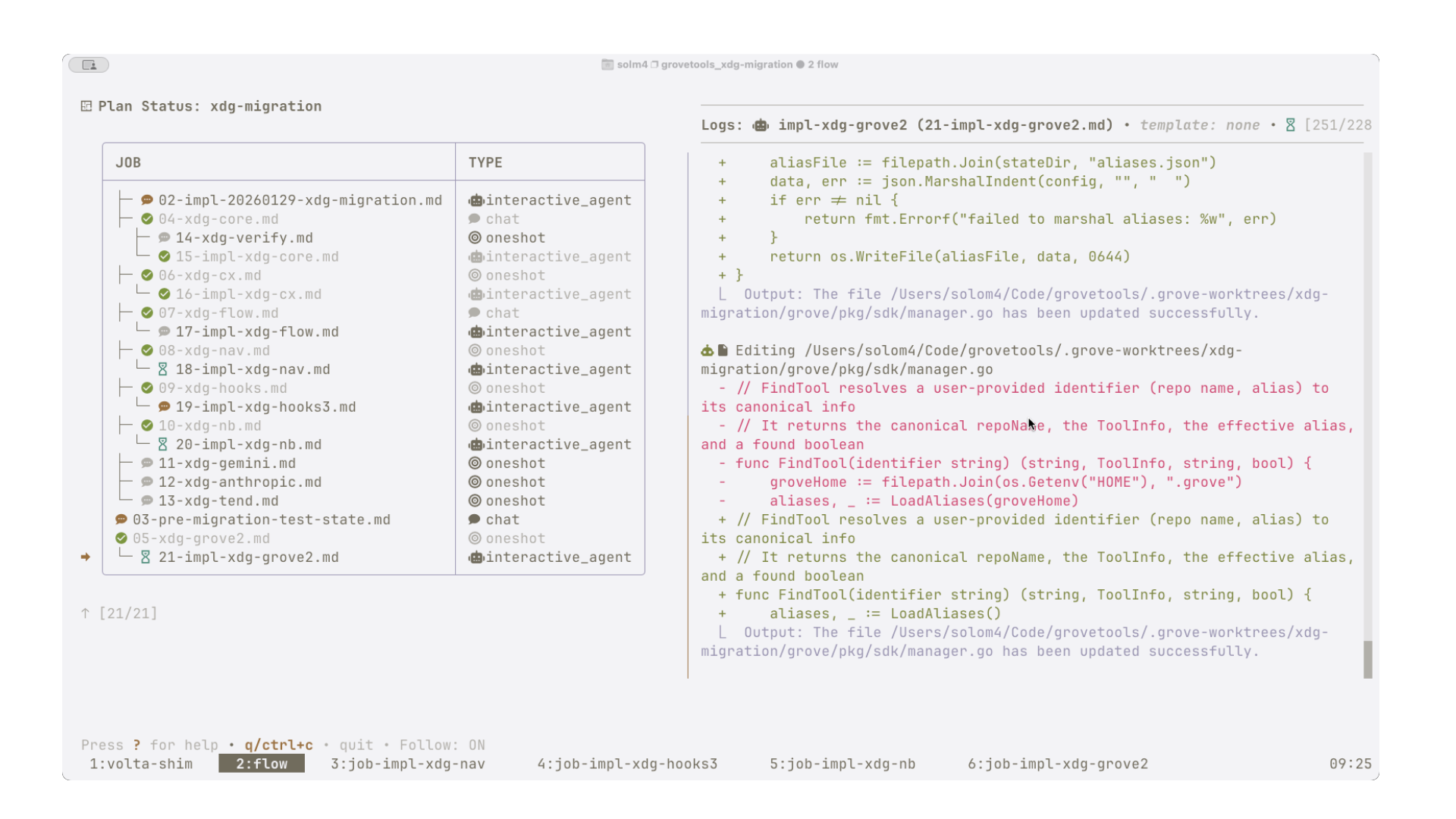
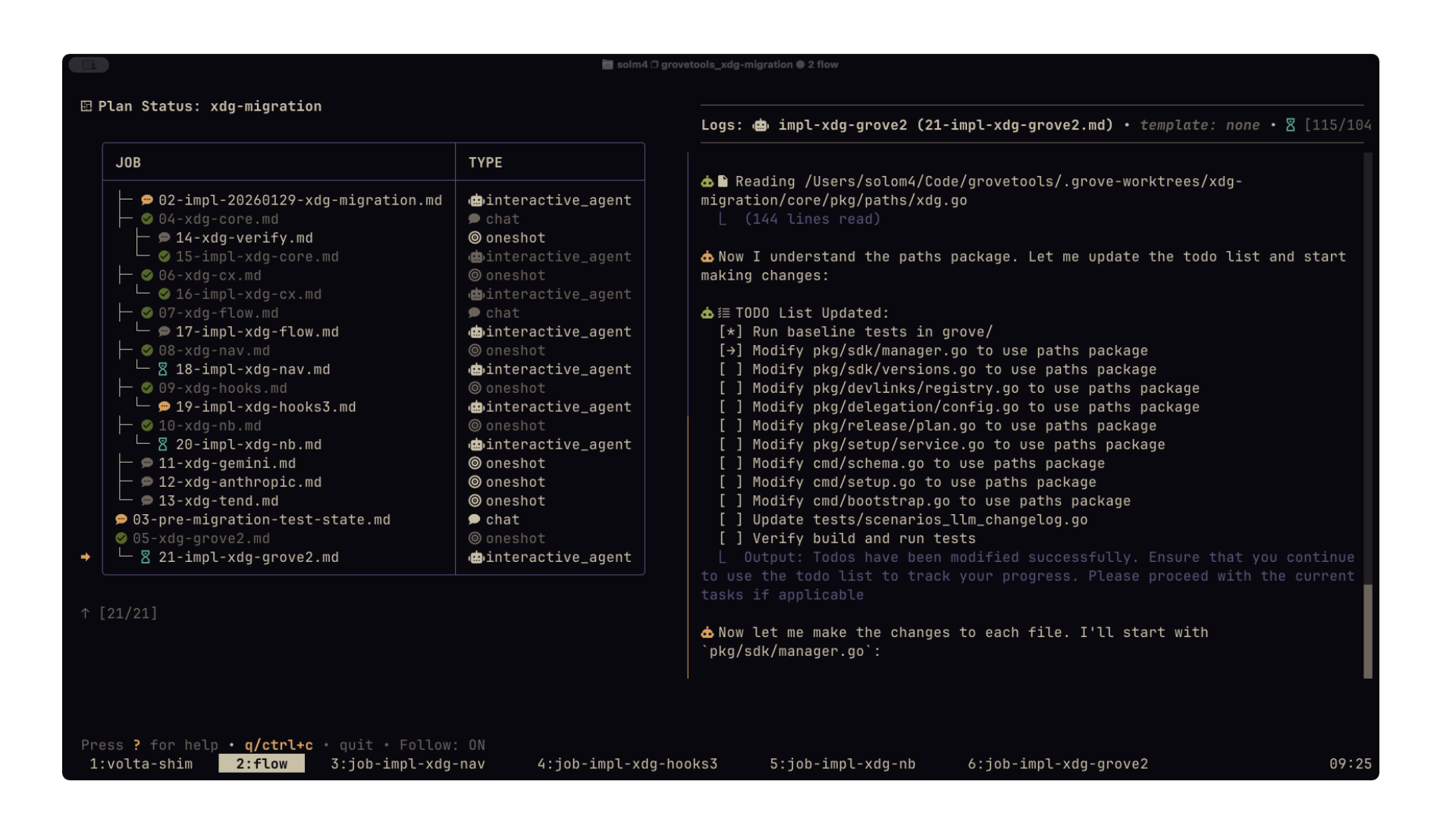
tmux windows. On the left is the markdown flow plan, on the right is the streaming Claude Code transcript. flow has tooling for safely merging & cleaning up all of the worktrees at the level of individual projects and multi-repo worktrees.Observability
Grove uses agent hooks (e.g. PreToolUse, etc) and scans notebook file frontmatter to see what work is ongoing, completed, or waiting for user input. It offers a view of “what am I actually working on right now” across all workspaces.
hooks TUI tracks the status of running flow jobs across Grove’s Workspaces. Hitting one of the number keys will jump to that workspace.Grove’s hooks tool can also perform lifecycle hooks for running things like formatting. It can also listen for Claude Code to exit “Plan Mode” and automatically capture the plan as a flow markdown file for refinement or historical record.
4. Notebooks
Notebooks are the central nervous system of Grove. I use them to store ideas, issues, plans, jobs, todos, project concepts, agent skills, and draft documentation. I bind nb tui to Control-N to open or focus it in a tmux window in any workspace.
Repo-Notebook Pairing
We could store these things in the main project’s git repository, but that seems messy and distracts from the development work. With Grove, each repository is paired with a sister notebook directory elsewhere on the filesystem that can be referenced by nb from within that repository or any of its worktrees.
For example a grove.toml configuration in $XDG_CONFIG_HOME:
[groves.projects]
path = "~/code/projects"
notebook = "mynotebook"

[notebooks.definitions.mynotebook]
root_dir = "~/notebooks/mynotebook"
This configuration would create the following repository/notebook relationship for project-a and project-b and also project-b’s feature-x worktree.
flowchart TB
    Config[["grove.toml"]]:::cyanNode

    subgraph Repositories ["Repositories"]
        Grove[("~/code/projects")]:::blueNode
        P1["project-a/"]:::blueNode
        P2["project-b/"]:::blueNode
        WT["feature-x/<br/><small>worktree</small>"]:::greenNode
        Grove --> P1
        Grove --> P2
        P2 -.-> WT
    end

    subgraph Notebooks ["Notebooks"]
        Notebook[("~/notebooks/mynotebook")]:::magentaNode
        N1[".../project-a/"]:::magentaNode
        N2[".../project-b/"]:::magentaNode
        Notebook --> N1
        Notebook --> N2
    end

    Config -->|groves| Repositories
    Config -->|notebooks| Notebooks
    P1 -.->|nb| N1
    P2 -.->|nb| N2
WT -.->|nb| N2This offers a solution to knowledge management that is available to the nb tool but stored separately to persist across branches. nb is also workspace-aware: if you start in an Ecosystem project, you can view all notebooks in the Ecosystem and move notes between them.
Notebook Workflows
The user interface of nb tui was inspired by neo-tree.nvim.
{
  "src": "/docs/overview/asciicasts/nb-demo.cast",
  "poster": "npt:0:32",
  "autoPlay": true,
  "loop": true
}nbNotes can be “promoted” to flow plans by pressing P on a note, creating a new worktree in which to develop the plan further and start coding. You can also instruct Claude Code to triage/combine notes/issues, promote them to plans, and monitor work going on in those worktrees. You can have agents use the nb tool to file new issues or notes on your behalf.
flow plans, their jobs, and various artifacts are saved in nb, preserving specifications, logs, and transcripts. All history is potentially useful in AI software development, and grove keeps an audit trail that is easy to feed back into context or agents, or for humans to review to remember what they were working on.
Here’s a diagram depicting how notes spin out plans, which do work. Meanwhile the original note travels through various kanban-esque states.
flowchart TD
Inbox[" inbox"]:::cyanNode
Issues[" issues"]:::cyanNode
InProgress[" in_progress"]:::cyanNode
Review[" review"]:::cyanNode
Concepts[" concepts"]:::cyanNode
subgraph flow
direction TB
Plan[" plan/"]:::blueNode
Jobs{"jobs.md"}:::blueNode
Agent(("agent")):::blueNode
Artifacts[".artifacts/<br/><small>briefing, transcript, log</small>"]
CodeChanges(["code changes"]):::blueNode
Archive[".archive/"]
Plan --> Jobs --> Agent --> CodeChanges
Jobs -.-> Artifacts
Plan -.-> Archive
end
Context(["context for future plans"]):::magentaNode
Skills["skills"]:::magentaNode
Skills --> Agent
Inbox --> Issues
Issues --> InProgress
Issues -->|promoted| Plan
InProgress --> Review
CodeChanges --> Review
Review -->|merge| CodeChanges
Agent -.->|generates| Concepts
Concepts -->|cx| Context
Artifacts -->|cx| Context
Archive -->|cx| Contextcx.My nb process accomplishes what many would use Github for but in a local format. Grove has experimental support for syncing issues with nb but there are no guardrails protecting malicious prompt injections from entering the local nb system so I don’t recommend using it.
It is easy to create a git repo for any notebook. You can run nb git init, then in the TUI, press = and C to commit all the notes. nb tui will display which notes are new/changed, etc in the tree.
Skills & Concepts
I use nb as a long-running, curated memory for agents. I disable auto-compact in Claude Code and favor creating fresh agents that get up to speed by reading previous markdown jobs from flow plans. For a more systematic form of memory I use skills and concepts.
Each notebook can have a special skills directory that adheres to the standard SKILL.md format. Grove’s skills tool scans notebooks for skills and copies them to various directories expected by Claude Code, Codex, and OpenCode. If a skill is stored in an “Ecosystem” notebook, grove skills sync --ecosystem will install skills at every constituent repository of the ecosystem. Grove provides a skill-creator skill that teaches agents how to structure and install new skills correctly. When I have an AI coding session that goes particularly well or involves a complex workflow I know I’ll need to repeat, I ask the agent to create a new skill in the notebook. This creates a streamlined loop for capturing and updating desirable agent behavior.
nb also implements the notion of a “concept”. While not industry standard like skills, concepts are special directories that contain Markdown files that explain architectural patterns, development histories, and how the system works at whatever level of granularity feels appropriate. Grove has a concept-creator skill for agents to maintain this system, and nb has tools for helping agents explore concepts in the current repo, across the ecosystem, or across the whole filesystem.
As I develop software, I have agents read, update, and create new concepts. Concepts can link to other concepts, skills, or plans. The docgen tool can crawl these directories and render static developer documentation websites.
Concepts help me maintain a mental model of software projects as I spend less time reading code line by line. I routinely pass concept directories to the cx tool during plan generation or feed them to freshly instantiated agents to bootstrap their understanding of a specific domain.
5. Development and Testing
Terminal UIs
Most Grove tools have TUIs, and keys are vim-like. Key shortcuts are visible with ?. Not all follow the same conventions yet but I’m trying to standardize and make this configurable soon!
All TUIs follow a central theme and can adopt your default terminal colors.
[tui]
  theme = "terminal"
Grove has a daemon that can be invoked with grove core groved start. This will make things like the nav and hooks tools more performant by doing things like git status and carrying out workspace or agent session discovery in the background.
CLIs
Grove’s CLIs can return JSON (for various state info) or can be run by LLMs. For example, an agent can curate context with the cx CLI, construct a flow graph of Markdown files and run them, then monitor the status of agents/chats with flow status and hooks. It can introspect workspaces to understand where things are.
The cx tool can be used by agents to assemble context. This is similar to what Claude Code does in Plan Mode, but it saves the results into a file list for review and persistence. You can have the agent figure out what it thinks is important, then confirm its understanding, revise it, and save the results (associating the curated context with a particular plan).
Scenario Testing
Claude and I developed tend early on in Grove’s history. We needed a way for Claude to simulate different scenarios reflecting different environments, projects, plans, notebook setups.
My favorite part about tend is --debug mode. It creates a tmux session dedicated to the test. It will set up a fresh sandboxed environment and walk through every step of the scenario, printing the grove tool commands and their output. During each step, I can observe the sandbox changes — how new contexts, plans, notes, jobs are created and executed and verified. This has made me more confident allowing Claude Code to make sweeping changes and develop autonomously. And being able to observe files changing in the test sandbox helps me understand what’s happening and whether or not we’ve achieved the desired specification.
Another cool feature of tend is how it can function like playwright for TUIs. Tend scenarios can launch tmux sessions running TUIs and tend can attach to, send keystrokes, and verify content, etc. It can be a bit brittle because it’s hard to select content in TUIs the same way you can with websites but good for making sure some things are visible. I have tend-tester and tui-explorer skills for having Claude develop these kinds of tests.
Grove Binaries
Why is Grove split across so many repos and individual tool binaries? I did this to separate concerns for each tool. I think multi-repos like this are a decent way to parallelize work and feature dev. It also keeps repos to a manageable size and complexity for agents and the cx tool. Binary build times are small. Multi-repositories themselves create potential overhead and complexity, but I believe these downsides can be mitigated by how easy it is to create developer tooling to address the drawbacks.
Case in point: Grove has its own dedicated package manager, the grove CLI tool! It is a Swiss Army knife for managing the ecosystem, e.g. installing and updating the other tools. It can carry out parallel builds and versioned releases of all the grove tools. It can bootstrap new ecosystems and repositories. It can run commands across all repos in an ecosystem. It can build all repos in an ecosystem. It has a setup wizard. Is this excessive? Maybe. Could it have been simpler? Maybe. But I’m having fun so whatever :)
One of my favorite parts of Grove’s CLI tool is how it manages global symlinks to binaries built from different worktrees. In any repo or worktree run grove dev cwd, and it sets PATH binary to the one from the worktree. This is useful for testing binaries on the fly while developing.
Docgen
Grove has tools for documentation generation. docgen uses cx to submit entire codebases to the Gemini API along with new or previous documentation versions. Gemini returns an updated version of the docs, with surprisingly accurate edits. Docs are drafted in the nb tool and selectively synced to the repository. docgen aggregate will scan all repository notebooks for docs and these can be output to static website generation tools like Astro. It can capture CLI help menus for tools and JSON schemas for configuration. Grove’s CLI tool performs LLM-based changelog generation during release, diffing all changes from the previous release to create a CHANGELOG.md entry.
Inspiration
Grove was inspired by the Neovim Plugin gp.nvim. I used this plugin heavily in 2024-2025. It made it easy to select large blocks of code to make precision edits and generate new code. I hacked together a context management approach using Neovim and Harpoon that enabled me to quickly mark files to be sent along with every gp.nvim API request. Over time, I found myself assembling larger lists of files using scripts. I would create a directory named nb inside each code project to store plans and notes. Creating a precise assortment of context comprised of plans, notes, and prompts generally led to predictable and controlled development. I was also a heavy user of tmux-sessionizer, a tool for jumping between projects quickly using key bindings.
When agents like Claude Code were released, I created new tools written in Go to solidify this approach, but the ideas remain largely the same.
gp.nvim-> Replaced by Claude Code and grovetools- Harpoon -> Replaced by Grove’s
cxtool andgrove.nvim - Ad hoc
nbdirs -> Replaced by Grove’snbtool - API-based planning process -> Replaced by the
flowtool andgrove-gemini - Sessionizer -> Replaced by Grove’s
nav